Virtual Pokémon card packs
Packs from MX$200 to MX$10,000. Each one holds a real card from the seller.


You buy a pack from a card seller
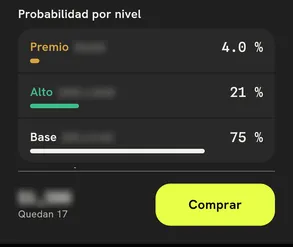
You see the odds by tier before you pay
- Open the seller's store or their show on Onda.
- Check Odds by tier: Prize, High and Base.
- Pay with the card saved in the app.
You tear the seal in the app
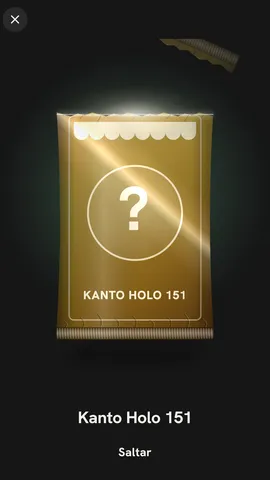
Swipe your finger across the line and your card comes out
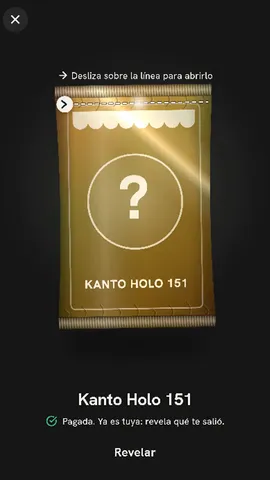
- Tap Reveal on your paid pack.
- Swipe across the line: the seal tears.
- The card comes out face down and flips over.
The card ships to you, or you trade it for credit
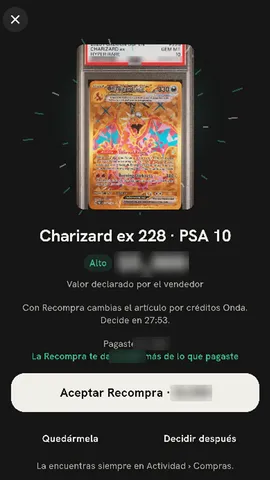
Buyback: credit to shop on Onda
- Tap Keep it and the seller ships you the card.
- Or tap Accept Buyback and get credit to shop on Onda.
- Your pack stays in Activity › Purchases.
You can also open it on a live show
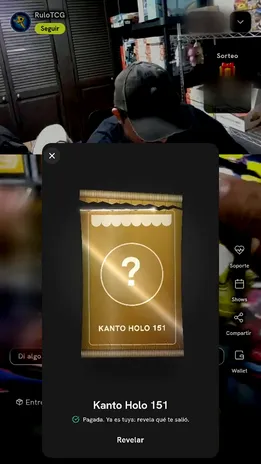
The panel opens over the stream
- Join your seller's show.
- Buy the pack in the show shop.
- Tear the seal without leaving the live.
Questions about packs
Are the packs real?
Each pack holds a real card the seller has. If you keep it, the seller ships it to you. It is not a digital card.
What is Buyback?
If the seller offers it, you trade your card for credit to shop on Onda. It is not cash. You have a set time to decide.
How do I know what I can get?
Before you pay, you see Odds by tier: Prize, High and Base, with what is left in the pack.
Where do I see my card afterward?
In the app, under Activity › Purchases. Track the shipment or the Buyback there.
Get Onda and open your first pack.
A real seller, a real card, and you tear the seal.